Table of Contents (18 Sections)
- How to Use PDF to Plain Text (.txt) Step by Step
- Quick Reference Standards
- Common Mistakes to Avoid
- Frequently Asked Questions
- Is the PDF to Plain Text (.txt) tool free to use?
- Does PDF to Plain Text (.txt) upload my files or data to any server?
- Can I use PDF to Plain Text (.txt) on a mobile phone?
- What else is included inside the PDF & Document Studio?
- More Tools Inside PDF & Document Studio
- Real Problems People Face With PDF to Plain Text
- Why Our PDF to Plain Text Solution Is the Best Choice for You
- Why We Keep PDF to Plain Text Openly Free for Everyone
- Simple Everyday Tips for Clean Results
- Quick Answers Before You Begin
- Who gets the most value from this PDF to Plain Text guide?
- Will I face hidden fees, watermarks, or daily limits?
- How can I finish fastest on a mobile phone?
- Helpful Related Guides & Official Reference
Need quick, stress-free help with PDF to Plain Text without running into login walls, hidden fees, or confusing steps? You are in the right place. This simple, human-written guide is built specially for students submitting exam forms, job seekers updating resumes, and office staff handling daily reports who just want their work done cleanly on the very first try.
Table of Contents
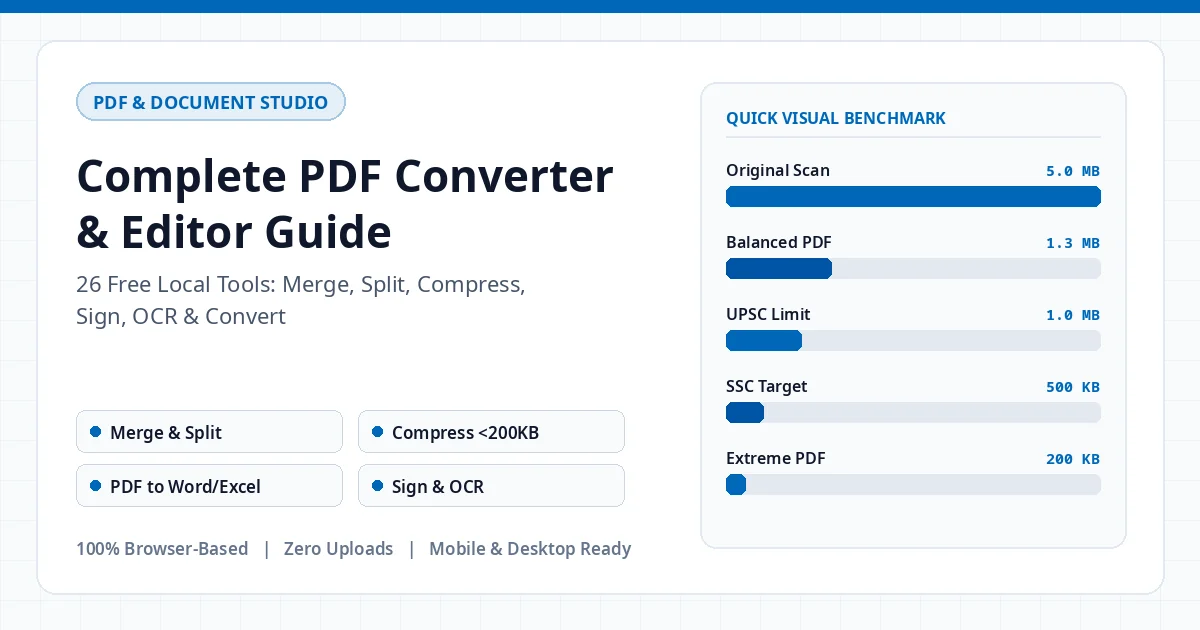
Looking for a fast, clean, and reliable PDF to Plain Text (.txt) without sign-ups, daily limits, or watermarks? This built-in tool inside our PDF & Document Studio helps you handle your task directly inside your mobile or desktop browser. Specifically, it is built to extract selectable text with word/line counts.
All PDF processing happens locally in your browser memory with zero signups or waiting, keeping Aadhaar copies, mark sheets, resumes, and signed contracts completely private. Whether you are working on an exam form, office report, study assignment, or daily calculation, you get instant output in seconds with simple controls.
How to Use PDF to Plain Text (.txt) Step by Step
- Open PDF to Plain Text (.txt) directly using the tool link (/pdf-converter-studio?tool=pdf-txt) on your phone or computer.
- Enter your exact input figures (such as amount, rate, duration, marks, or classes) in the clean input fields.
- Watch the live result cards and breakdown update automatically without reloading the page.
- Review the summary figures and click Copy or Print / Save PDF to keep a clean record.
Quick Reference Standards
| Standard / Topic | Key Rule / Value |
|---|---|
| UPSC / State PSC PDF | 300 KB - 1 MB |
| SSC / IBPS / Railway PDF | 100 KB - 500 KB |
| Job Portal Resume PDF | Under 500 KB |
| KYC / Bank Docs | Under 2 MB |
Common Mistakes to Avoid
- Typing approximate numbers instead of verified statement or datasheet figures when using PDF to Plain Text (.txt).
- Skipping the comparison or breakdown details — always check both totals and individual components (such as interest vs principal or tax slabs).
- Forgetting to double-check units or time periods (monthly vs yearly, inclusive vs exclusive) before finalizing decisions.
Frequently Asked Questions
Is the PDF to Plain Text (.txt) tool free to use?
Yes. PDF to Plain Text (.txt) is 100% free with no account registration, no daily usage limit, and no hidden watermarks.
Does PDF to Plain Text (.txt) upload my files or data to any server?
No. Like every utility inside the PDF & Document Studio, it works smoothly right on your phone or laptop so your private data stays on your device.
Can I use PDF to Plain Text (.txt) on a mobile phone?
Yes. The layout is mobile-first and works smoothly on Android Chrome, iPhone Safari, and desktop browsers without installing any app.
What else is included inside the PDF & Document Studio?
This hub includes 26 connected tools in one place, including Unlock PDF (Known Password), Compress PDF, OCR PDF (Scanned Text) and more.
More Tools Inside PDF & Document Studio
- PDF & Document Studio (All Tools)
- Unlock PDF (Known Password)
- Compress PDF
- OCR PDF (Scanned Text)
- Compare PDF (Side-by-Side)
Real Problems People Face With PDF to Plain Text
If you have ever searched online for PDF to Plain Text during an urgent deadline, you already know how frustrating most websites feel. Half the pages waste your time with popups, while others ask you to create an account before letting you save your own work.
Here are the everyday troubles people commonly run into before finding a clean, honest solution:
- Portals rejecting your document at the last minute because the file size is over 200 KB or 500 KB.
- Websites letting you finish all your work and then suddenly demanding a paid subscription or login just to download the file.
- Ugly brand watermarks stamped across your clean resume, marksheet, or official application letter.
- Formatting breaking or pages flipping upside down when you share files between Android phones, iPhones, and laptops.
Why Our PDF to Plain Text Solution Is the Best Choice for You
We built this experience around real daily needs rather than complicated menus. Everything opens fast even on regular mobile data, works smoothly on Android phones, iPhones, and laptops, and gives crisp results without making you guess which button to tap.
Unlike websites that lock basic options behind paid upgrades, you get full accuracy, clean formatting, and plain everyday steps right here. Whenever you are ready to start, simply open our Complete PDF Converter & Editor Studio and finish your work in seconds.
| What Matters to You | Typical Paid / Cluttered Sites | Our Openly Free Platform |
|---|---|---|
| Sign-Up or Login | Forces email or phone OTP | Zero login required — start immediately |
| Hidden Cost / Trial | Blocks download with Pro popup | 100% openly free with no daily cap |
| Watermarks | Stamps logo on your final work | Completely clean, ready-to-submit output |
| Mobile Usability | Slow, crowded, hard to tap | Fast, simple layout built for phones & PCs |
Why We Keep PDF to Plain Text Openly Free for Everyone
Many readers ask why we offer PDF to Plain Text and hundreds of other everyday utilities completely free when so many apps charge monthly subscriptions. Our belief is simple: basic everyday help should never sit behind a paywall.
Students preparing for board or government exams, job seekers editing resumes late at night, small shop owners, teachers, and families managing bills deserve fast, honest tools they can trust. Keeping it openly free helps everyone save time and easily share the link with friends or classmates who need the same help.
Simple Everyday Tips for Clean Results
Keep these three quick habits in mind whenever you work on PDF to Plain Text so your output comes out right on the very first attempt:
- Always check the exact file size limit (such as 200 KB, 500 KB, or 1 MB) printed on your exam or job form before saving.
- Zoom in on the finished page once before uploading to confirm your name, roll number, and signature look sharp.
- Keep one clean copy saved in a dedicated folder so you do not have to redo the same document twice.
Taking ten extra seconds to preview your final output before submitting saves you from last-minute portal rejections or repeated effort. Bookmark this guide so you always have fast, dependable help ready whenever needed.
Quick Answers Before You Begin
Who gets the most value from this PDF to Plain Text guide?
Anyone looking for straightforward, clear help with PDF to Plain Text can use it right away — whether you are a student on a budget smartphone, an employee rushing to finish an office report, or a parent handling family paperwork at home.
Will I face hidden fees, watermarks, or daily limits?
Never. Our PDF to Plain Text workflow remains openly free all year round with zero account creation, zero trial traps, and completely clean results you can use anywhere.
How can I finish fastest on a mobile phone?
Keep your details or source file ready, tap the direct tool button on this page, verify the preview once, and save your finished copy. Returning to this PDF to Plain Text guide takes just one tap if you save it in your bookmarks.
Helpful Related Guides & Official Reference
Explore more free tools and easy step-by-step guides across our website to save time on related tasks:
- Complete PDF Converter & Editor Studio (Open Free Live Tool)
- Page Numbers, Rotate & Crop – Free Online Tool & Simple Guide
- Watermark PDF – Free Online Tool & Simple Guide
- Repair & Rebuild PDF – Free Online Tool & Simple Guide
- Compare PDF (Side-by-Side) – Free Online Tool & Simple Guide
For official public standards and additional reading related to PDF to Plain Text, you can also check the PDF Association Official ISO 32000 Resource.
User Ratings & Feedback
Verified ratings for PDF to Plain Text (.txt) – Free Online Tool & Simple Guide
"Extremely fast and clean utility. Saved me a lot of time without any clutter."
Frequently Asked Questions
Quick answers about PDF to Plain Text (.txt) – Free Online Tool & Simple Guide
About PDF to Plain Text (.txt) – Free Online Tool & Simple Guide
With PDF to Plain Text (.txt) – Free Online Tool & Simple Guide, you can process pdf & document guides inputs in real time while keeping your data completely private on your own device. Every calculation runs locally in your browser, ensuring zero lag even on slow connections and keeping sensitive inputs off external servers.
- Instant client-side execution for PDF to Plain Text (.txt) – Free Online Tool & Simple Guide with zero page reloads.
- Organized under Pdf & Document Guides for fast navigation and structured internal linking.
- Mobile-friendly layout with clean typography and copy-ready outputs.
- Pro Tip: Use the related tools below to cross-verify secondary metrics within the Pdf & Document Guides category.
Yes, PDF to Plain Text (.txt) – Free Online Tool & Simple Guide is 100% free with no account registration, usage caps, or hidden paywalls.
No. All inputs stay inside your browser session and are not uploaded or stored on external servers.
Yes, the layout adapts automatically to smartphones, tablets, and desktop browsers for smooth pdf & document guides workflows.
Related Pdf & Document Guides Tools
Browse All Tools →All-in-one browser-local image converter and exam-form photo studio. Convert PNG, JPG, WebP, BMP, ICO, SVG, PDF, Base64, compress images to exact target KB (20KB/50KB/100KB for SSC, UPSC, PAN, Passport), crop, rotate, filter, watermark, strip EXIF metadata, preview with Before/After split slider, and batch download as a single ZIP with zero server uploads.
AUDIO & VIDEO UTILITIESProcess audio and extract HD video frames 100% locally in your browser privately with no uploads. Includes 10 compact card tools: MP3/OGG/M4A to 16-bit PCM WAV, Sample Rate & Mono/Stereo Converter, Visual Waveform Audio Trimmer, Volume Normalizer & Booster, Speed/Pitch Shifter & Reverse, Silence Trimmer & Fade-In/Out, Browser Voice Recorder to WAV, HD Video Frame/Thumbnail Extractor, Video Contact Sheet Storyboard Builder, and Media Info Inspector.
SECURITY & ARCHIVE UTILITIESGenerate scannable QR codes (URL, Indian UPI Payment, Wi-Fi, vCard) and Code128/EAN-13 barcodes, compute SHA-256/SHA-512/MD5 hashes, verify file checksums, encrypt/decrypt text and files with AES-256-GCM Web Crypto, create and extract multi-file .ZIP archives, and generate high-entropy passwords/UUIDs 100% locally in your browser privately with no uploads.
LEGAL & OFFICE10 free online generators for GST invoices, privacy policies, terms, disclaimers, rent receipts, leave applications, and formal office letters.
FINANCE & NUMBER UTILITIESAll-in-one fast, private finance, number system, Indian utility, and time converter hub. Includes 14 compact cards: Number to Words (Indian Lakhs/Crores & International), GST Inclusive/Exclusive, Salary CTC/Monthly/Hourly, CGPA to Percentage (CBSE/AICTE/US 4.0), Gold Weight (Tola/Gram/Carat), EMI & Loan Split, SIP/Lumpsum Compound Growth, Binary/Octal/Hex/IEEE-754 Float, Roman Numerals, Fraction/Decimal/Percent, Aspect Ratio & DPI/PPI, Margin/Markup/Discount, World Timezone (IST/UTC/Global), and Unix Epoch to ISO 8601.
UNIT & MEASUREMENTConvert 200+ units across 20 compact card-based converters directly in your browser. Includes Length, Weight, Temperature, Area with Indian Land Units (Bigha, Biswa, Katha, Gaj, Acre, Hectare), Volume, Speed, Time, Pressure, Energy, Power, Force, Torque, Angle, Fuel Mileage, Frequency, Digital Storage, Data Speed, Electrical (V/A/Ohm/kVA/kW/PF), Density, and Illumination with All-at-Once Live Matrix and step-by-step formulas.
Trending Online Tools
Full-featured fast, private PDF converter and editor studio privately with no uploads. Merge PDF, Split PDF, Compress PDF, PDF to Word (.docx), PDF to Excel (.xlsx), PDF to PowerPoint (.pptx), PDF to JPG/PNG, PDF to Markdown/Text, Word/Excel/PPT to PDF, JPG to PDF, Scan to PDF, HTML to PDF, Sign PDF, Edit PDF, Redact PDF, PDF Forms Filler, Unlock PDF, Organize Pages, OCR PDF, Compare PDF, Repair PDF, Watermark, Page Numbers, Rotate, Crop & Metadata Cleaner.
TRENDINGConvert and validate developer data formats 100% locally in your browser. Includes 18 compact card tools: JSON, CSV, TSV, XML, YAML, TOML, SQL, TypeScript Interfaces, PHP Arrays, .env/INI, URL Query Strings, URL & HTML Entities, Base64/Base32/Hex/Binary, JWT Token Decoder, Cron to Human Schedule, and Line-by-Line Code Diff with instant next-step actions and exact line-error pointers.
TRENDINGConvert Markdown, HTML, Plain Text, Multi-Page PDF, HTML Tables, RSS XML, SRT, WebVTT, YouTube SBV subtitles, Contact vCard (.vcf), and Calendar (.ics) files 100% locally in your browser. Includes live rendered preview, Subtitle Time-Shifter (+/- ms), Case & Slug cleaner, instant next-step actions, and zero server uploads.
TRENDINGConvert 230+ advanced scientific and engineering units across 24 card-based live matrix calculators. Covers Acceleration, Angular Velocity, Moment of Inertia, Specific Volume, Thermal Conductivity, Specific Heat, Heat Flux, Heat Transfer Coefficient, Thermal Expansion, Volumetric & Mass Flow Rate, Dynamic & Kinematic Viscosity, Surface Tension, Charge, Capacitance, Inductance, Resistivity & IACS Conductivity, Electric Field, Magnetic Flux & Tesla/Gauss, Radiology (Gray/Sievert/Becquerel/Curie), Sound dB/Neper, all 21 SI Metric Prefixes, Dry Volume, and Lumber Board Feet.
TRENDINGAll-in-one browser-local image converter and exam-form photo studio. Convert PNG, JPG, WebP, BMP, ICO, SVG, PDF, Base64, compress images to exact target KB (20KB/50KB/100KB for SSC, UPSC, PAN, Passport), crop, rotate, filter, watermark, strip EXIF metadata, preview with Before/After split slider, and batch download as a single ZIP with zero server uploads.
TRENDINGConvert 200+ units across 20 compact card-based converters directly in your browser. Includes Length, Weight, Temperature, Area with Indian Land Units (Bigha, Biswa, Katha, Gaj, Acre, Hectare), Volume, Speed, Time, Pressure, Energy, Power, Force, Torque, Angle, Fuel Mileage, Frequency, Digital Storage, Data Speed, Electrical (V/A/Ohm/kVA/kW/PF), Density, and Illumination with All-at-Once Live Matrix and step-by-step formulas.
Latest Guides & Articles
Browse All Posts →Use our free OCR PDF (Scanned Text) online directly in your browser. Extract text from scanned image-PDFs via...
Nov 28, 2026Use our free Compress PDF online directly in your browser. Shrink heavy PDF size with Strong/Balanced/Light DPI. Step-by-step...
Nov 28, 2026Use our free Unlock PDF (Known Password) online directly in your browser. Remove password protection using your known...
Nov 28, 2026Use our free Fill PDF Forms (AcroForm) online directly in your browser. Auto-detect fillable PDF fields, fill &...